
An Instagram carousel downloader is different from a basic post saver because the job is different. Instead of downloading one photo or one reel, users often want to save one complete multi-slide post with all of its slides intact, including mixed image-and-video assets or a sequence they need to review later. That makes full slide coverage more important. A tool that works well for a single post is not always the best option for carousel content. For this article, candidate pages were checked online first, and screenshots were captured from confirmed live URLs before being inserted into the document.
Key Takeaways
- [Carousel-specific workflows matter] The best tools in this category make it easier to save all slides from one post instead of treating a carousel like a normal single-item download.
- [Carousel intent is slide-first] Many tools use broader Instagram wording, but the real test here is whether the page feels useful for preserving one complete multi-slide post rather than a single image.
- [Browser tools dominate] Most carousel downloader options are web-based and are built around quick URL paste workflows.
- [Verified screenshot workflow] This version uses screenshots captured from live pages before the docx was produced.
Table of Contents:
Part 1. What Makes a Good Instagram Carousel Downloader
Full Carousel Coverage
The most important thing is whether the tool feels designed for multi-slide posts. A proper Instagram carousel downloader should help users save all images or videos in one post rather than forcing awkward one-by-one handling.
Mixed Media Handling
Many Instagram album posts contain both photos and videos. A good tool should feel comfortable with mixed media instead of being reliable only for photo-only posts.
Output Clarity
Carousel downloaders are more useful when the output is easy to understand. Users should not have to guess which slide is which or whether the tool grabbed the full set correctly.
Repeat Use Practicality
Some users save one album post occasionally, while others collect references, inspiration, ad examples, or campaign assets repeatedly. The best downloader should still feel usable after the first try.
Part 2. Best Instagram Carousel Downloader Tools
1. FastDL
FastDL is a highly effective Instagram carousel downloader built for users who want to save complete multi-slide posts quickly. It supports downloading photos, videos, reels, and full Instagram albums through a simple browser-based workflow. With its clear focus on carousel content, FastDL allows users to extract every slide from a post without downloading items one by one. The tool handles mixed media smoothly and requires no installation, making it ideal for fast, on-demand downloads. Whether you're saving inspiration, campaign examples, or creator content, FastDL delivers a reliable and efficient way to capture entire Instagram albums in high quality.

Key Features:
- Explicit support for Instagram carousel and album-style posts
- Simple browser workflow with no installation
- Useful for mixed post types including video and photo slides
- Easy copy-paste process for occasional or repeated use
Safety Rating: Medium to High
Supported Formats: Photo and video outputs depending on the source post
Max Quality: High depending on source availability
Step-by-Step Guide:
Step 1: Open FastDL.
Step 2: Copy the Instagram carousel or album post URL.
Step 3: Paste it into the downloader field and generate the result.
Step 4: Save the available slides or media outputs locally.
2. UniConverter
UniConverter is a powerful Instagram album downloader designed to help users save complete carousel posts with ease. Unlike basic downloaders, it supports full multi-slide extraction, allowing you to download all images and videos from a single Instagram post in one click. It maintains original quality and ensures clear organization of each slide, making it ideal for content creators, marketers, and researchers.

Key Features:
- Better for repeat asset handling
- Useful when carousel content needs post-download organization
- Supports broader media conversion tasks
- More practical for heavier workflows
Safety Rating: High
Supported Formats: Broad media formats for conversion and local handling
Max Quality: High depending on source and workflow
Step-by-Step Guide:
Step 1: Open UniConverter and choose the relevant download or import workflow.
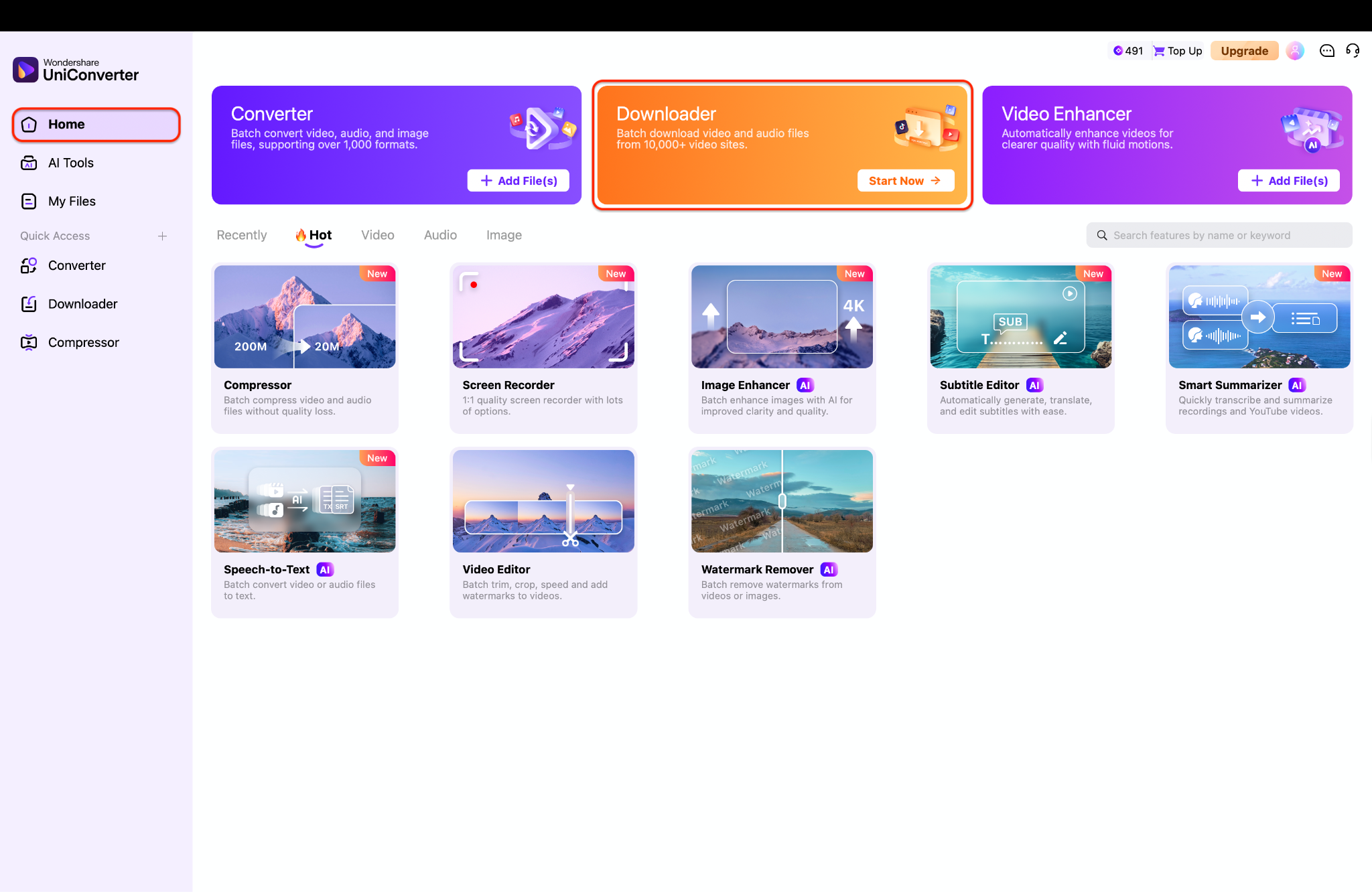
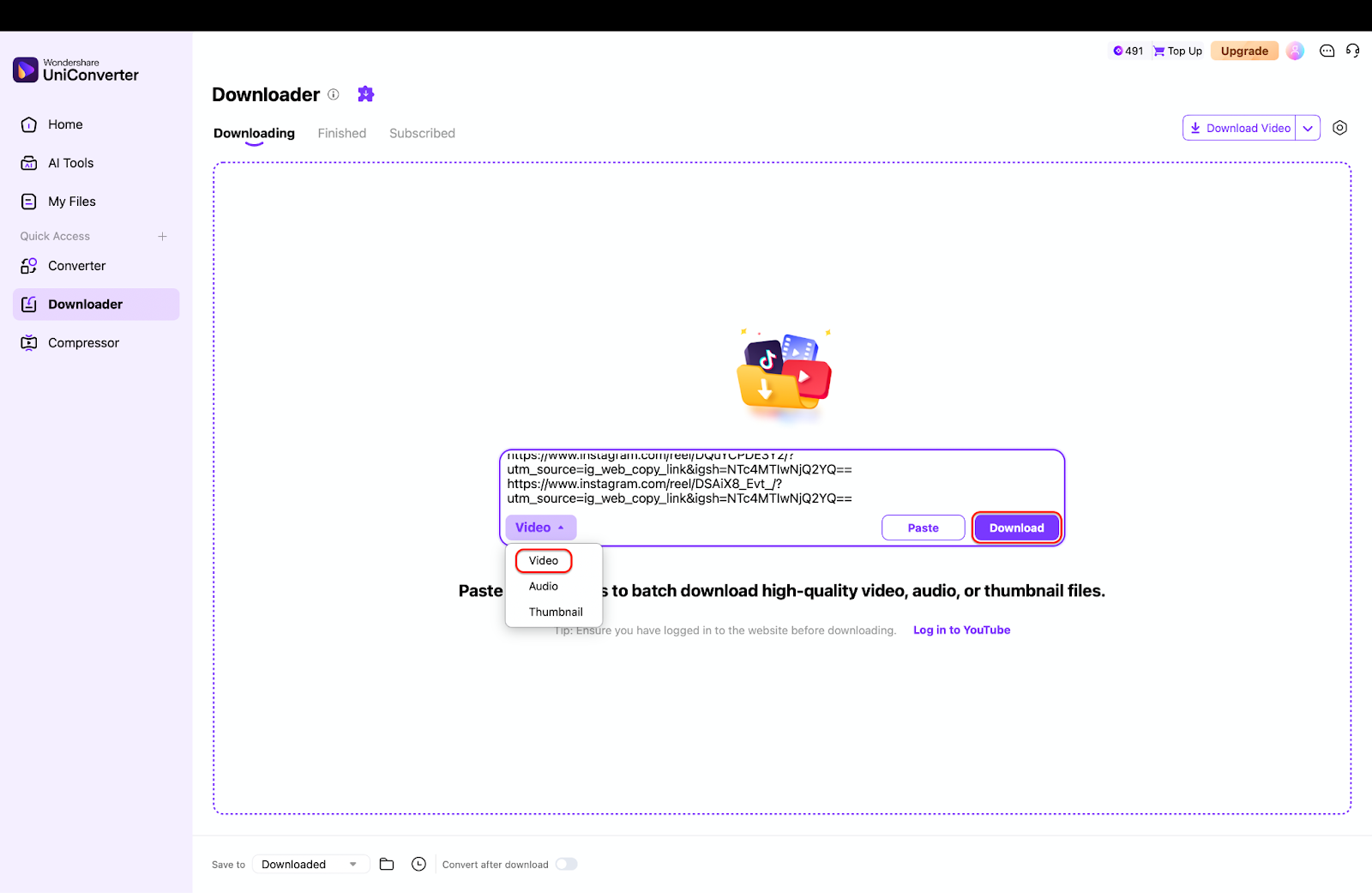
Step 2: Bring in the Instagram media link or saved source files.
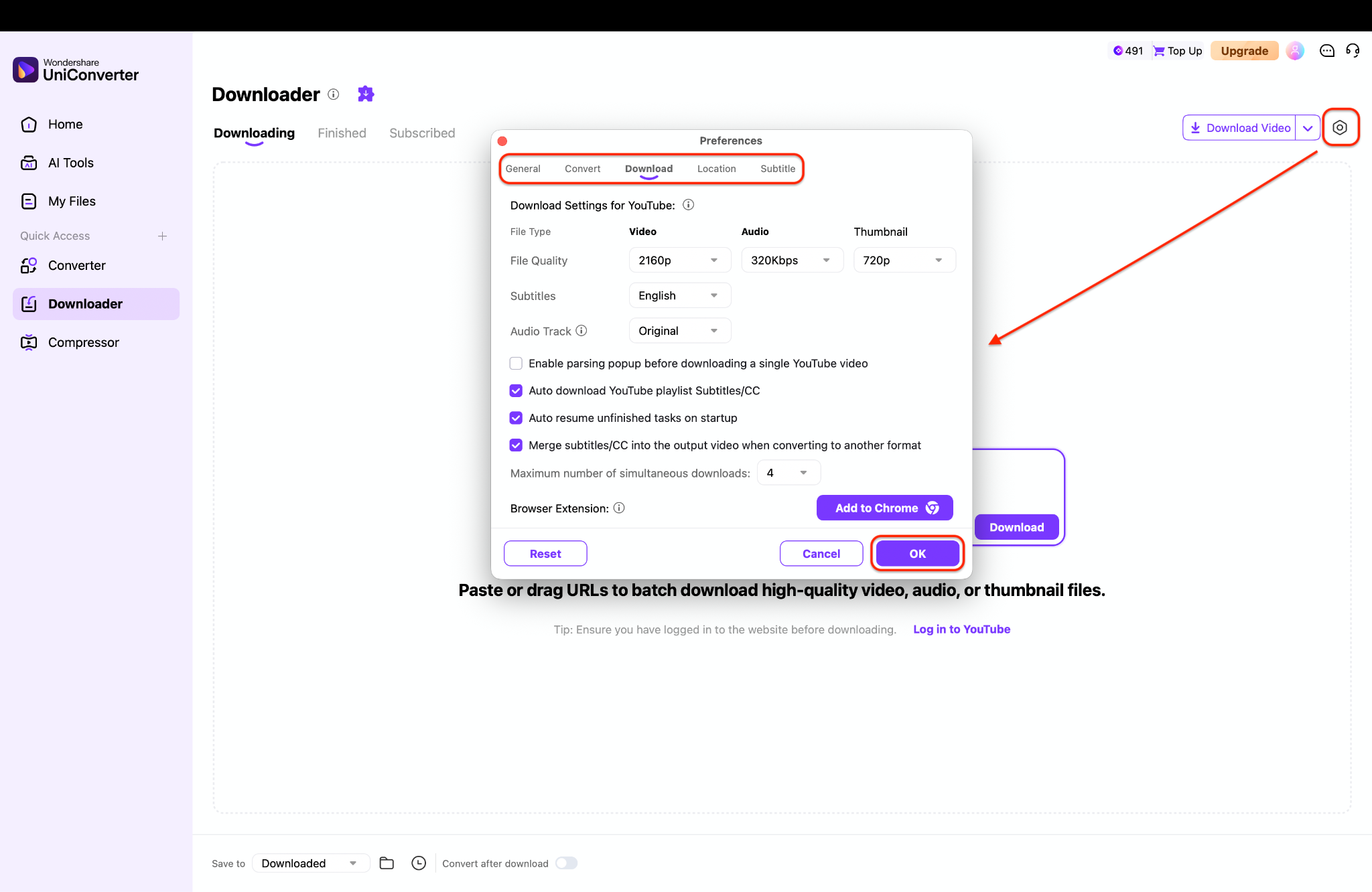
Step 3: Convert, organize, or prepare the assets as needed. Export the files into your preferred local structure.

Instagram Carousel Downloader for Saving Multi-Photo and Mixed Posts Faster
3. Toolzu
Toolzu is a clean and user-friendly Instagram carousel downloader that offers a polished browser-based experience. It enables users to download multi-slide Instagram posts, including both images and videos, using a simple URL paste workflow. The interface is intuitive and easy to navigate, making it suitable for beginners and casual users. Toolzu performs well for quick checks, inspiration saves, and light content collection tasks. While it may not emphasize carousel-specific features as strongly as some competitors, it still provides reliable performance for downloading Instagram albums efficiently without requiring installation or technical setup.

Key Features:
- Polished browser-first downloader page
- Good fit for users comparing multiple Instagram save tools
- Simple URL-based workflow
- Practical for quick carousel checks
Safety Rating: Medium
Supported Formats: Instagram media downloads via browser workflow
Max Quality: Good to high depending on source
Step-by-Step Guide:
Step 1: Open Toolzu’s Instagram downloader page.
Step 2: Paste the carousel post URL.
Step 3: Start the download generation flow.
Step 4: Save the slide outputs you need.
4. Inflact
Inflact is a comprehensive Instagram downloader that functions as more than just a basic carousel tool. It supports downloading Instagram albums, photos, videos, and reels while offering a broader ecosystem for social media content management. This makes it particularly useful for marketers, analysts, and researchers who frequently collect and review Instagram posts. Inflact’s platform provides a more structured and professional experience compared to lightweight tools, making it suitable for repeated use. Although it is less focused purely on carousel-specific workflows, it remains a strong option for users seeking a versatile and reliable Instagram album downloader.

Key Features:
- Broader Instagram downloader ecosystem
- Useful for users handling more than one media type
- Stronger service feel than barebones pages
- Relevant for repeat content collection
Safety Rating: Medium
Supported Formats: Photo, video, reels, and related Instagram media download workflows
Max Quality: Good to high depending on source
Step-by-Step Guide:
Step 1: Open Inflact’s Instagram downloader page.
Step 2: Paste the album or carousel post link.
Step 3: Let the page generate the media result.
Step 4: Download the slides or files you need.
5. InDown
InDown is a lightweight Instagram carousel downloader designed for speed and simplicity. It allows users to quickly save Instagram album posts by pasting a URL into a browser-based interface, with no installation required. The tool is best suited for occasional downloads and users who prioritize convenience over advanced features. It supports basic photo and video extraction from multi-slide posts and works well as a backup option when other tools are unavailable. While it lacks deeper functionality and organization features, InDown remains a practical and accessible solution for fast Instagram carousel downloads.

Key Features:
- No-install browser access
- Easy fallback option for Instagram post saving
- Simple URL handling
- Useful for occasional carousel downloads
Safety Rating: Medium
Supported Formats: Typical web-based Instagram media outputs
Max Quality: Good for casual use
Step-by-Step Guide:
Step 1: Open InDown.
Step 2: Copy and paste the Instagram carousel URL.
Step 3: Trigger the download flow.
Step 4: Save the available files locally.
6. SSSInstagram
SSSInstagram is a beginner-friendly Instagram album downloader that focuses on simplicity and ease of use. Its clear interface and straightforward workflow make it easy for users to download carousel posts, photos, and videos without confusion. By simply pasting a URL, users can quickly access and save multiple slides from an Instagram post. This makes it ideal for casual users who want a hassle-free way to download content. While its functionality is relatively basic and lacks advanced management features, SSSInstagram delivers a reliable and accessible solution for quick Instagram carousel downloads.

Key Features:
- Clear Instagram-specific downloader positioning
- Beginner-friendly page structure
- Simple URL paste model
- Useful for quick album saves
Safety Rating: Medium
Supported Formats: Browser-based Instagram content save workflows
Max Quality: Good for casual use
Step-by-Step Guide:
Step 1: Visit SSSInstagram.
Step 2: Paste the album post URL.
Step 3: Continue through the downloader workflow.
Step 4: Save the media slides you want.
7. SaveInsta
SaveInsta is a widely recognized Instagram downloader that supports saving carousel posts, reels, photos, and videos through a simple web interface. It is often used as a go-to option for users searching for quick and accessible Instagram download tools. With its easy URL-based workflow, SaveInsta allows users to download multi-slide posts without installation. While it is not highly specialized for carousel workflows, it still performs well for general album downloads. It is a practical choice for users who want a familiar, easy-to-use solution for saving Instagram content across different formats.

Key Features:
- Common search visibility in this category
- Simple browser-based access
- Useful for multi-format Instagram saving
- Practical fallback option
Safety Rating: Medium
Supported Formats: Instagram media download outputs across common post types
Max Quality: Good for casual use
Step-by-Step Guide:
Step 1: Open SaveInsta.
Step 2: Paste the Instagram carousel link.
Step 3: Generate the available post files.
Step 4: Download the slides you need.
Part 3. Detailed Comparison Table
|
Tool |
Type |
Best For |
Ease of Use |
Setup Needed |
Carousel Fit |
Main Strength |
Main Limitation |
|
FastDL |
Web |
Direct carousel and album saves |
Very easy |
No installation |
Strong |
Explicit carousel support |
Browser-tool limitations |
|
UniConverter |
Desktop |
Repeat asset handling and organization |
Easy after setup |
Installation required |
Good |
Better long-term media workflow |
Less instant than browser tools |
|
Toolzu |
Web |
Cleaner browser workflow |
Very easy |
No installation |
Good |
Polished page experience |
Less explicitly carousel-focused |
|
Inflact |
Web |
Research and repeat social media collection |
Easy |
No installation |
Good |
Broader service feel |
Heavier than minimalist tools |
|
InDown |
Web |
Lightweight backup use |
Very easy |
No installation |
Good |
Fast alternate option |
Limited differentiation |
|
SSSInstagram |
Web |
Casual quick saves |
Very easy |
No installation |
Good |
Beginner-friendly workflow |
Basic output handling |
|
SaveInsta |
Web |
Mainstream fallback option |
Very easy |
No installation |
Good |
Familiar category presence |
Less specialized for carousel needs |
Part 4. Common Carousel-Specific Download Use Cases
Saving Multi-Photo Inspiration Posts
Carousel downloader intent is often tied to inspiration boards, reference gathering, or collecting examples from creators, brands, and publishers. These users usually care about getting every slide from one post in order instead of only the cover image.
Capturing Mixed Photo-and-Video Posts
Some carousel posts contain a mix of still images and short video slides. That makes mixed-media support valuable, especially for users reviewing creator assets or campaign examples.
Archiving Album Posts for Team Review
Marketing and content teams sometimes save Instagram album posts to review layouts, messaging, hooks, and creative sequencing later. In those cases, repeatability and output clarity matter more than raw speed alone.
Collecting Repurposeable Reference Material
Some users are not downloading for entertainment at all. They are collecting references, storyboard examples, swipe structures, or creative patterns. A better carousel downloader helps that workflow feel less messy.
Conclusion
If your priority is a direct Instagram carousel downloader with clear multi-slide-post relevance, FastDL stands out most strongly in this set because its page explicitly supports carousel content. Toolzu, Inflact, InDown, SSSInstagram, and SaveInsta all work as useful browser-based alternatives depending on whether you prefer cleaner design, broader utility, or quick fallback access. If you expect to save and organize Instagram media regularly, UniConverter becomes more useful after the download stage because it gives you more control over the files once they are local.
FAQ
-
What is an Instagram carousel downloader?
It is a tool designed to save Instagram posts that contain multiple slides, such as album posts with several photos, videos, or mixed media items. -
Is an instagram carousel downloader the same as an instagram album downloader?
In practice, yes. Many tools use carousel, album, gallery, or multiple-photo wording to describe the same basic download scenario. -
Which tool is best for direct carousel intent?
FastDL is one of the strongest options here because its page explicitly mentions carousel support in the downloader workflow. -
Why would someone choose a desktop option for carousel content?
A desktop tool makes more sense when the user needs better organization, conversion, and repeat-use workflow after the Instagram assets are downloaded. -
Did this article use real screenshots from live pages?
Yes. The screenshots included in this file were captured from live pages before the document was generated.
